Stop Dreading Your Numbers

The bookkeeping system for people who didn't start a business to do accounting.

Bookkeeping Rescue Kit Excel template preview

Sound Familiar?

You're not bad at money. You just need a system that actually fits how you work.

Mixed expenses icon

You Mix Personal and Business Expenses

Your business account buys groceries. Your personal account pays for software. Tax time is a scavenger hunt.

Miscellaneous category icon

Everything Is "Miscellaneous"

If you've ever categorized half your transactions as "misc" or "other," you're not alone — but you're also not getting the deductions you deserve.

Behind on taxes icon

You're Behind on Tax Filings

Every quarter you promise yourself you'll catch up. Every quarter you don't. The stress compounds with interest.

Condescending CPA icon

CPAs Have Been Condescending

You've been made to feel small for not knowing what a P&L is. You don't need a lecture — you need a system.
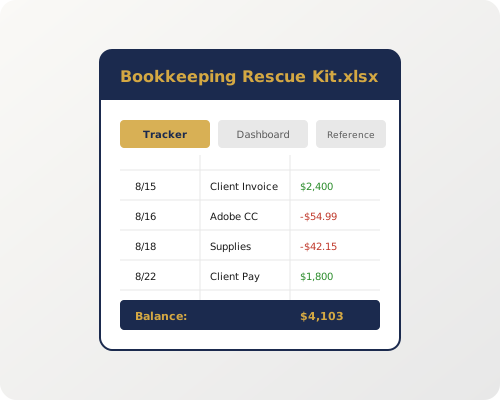
Meet the Bookkeeping Rescue Kit

A no-jargon Excel template pack that turns your financial mess into a clear, monthly picture of your business. No accounting degree required.

Bookkeeping Rescue Kit product mockup showing Excel tabs

It's not software. It's a system.

  • Checkmark Five connected tabs that handle everything from daily transactions to monthly close-out — without double-entry.
  • Checkmark Plain-English categories mapped to Schedule C lines, so tax season is fill-in-the-blank, not forensic accounting.
  • Checkmark A 15-minute monthly review that replaces hours of dread with a clear dashboard you actually understand.

What's Inside the Kit

Five tabs. One file. Everything you need to run your books without losing your mind.

Transaction Tracker icon

Transaction Tracker

Enter transactions with auto-categorizing dropdowns. Color-coded for income, expenses, and transfers. Calculates running totals as you type.

Dashboard icon

Monthly Dashboard

Income vs. expenses at a glance. Top spending categories. Profit margin trend. All auto-populated from your transaction data — no formulas to write.

Category Reference icon

Category Reference

Every category explained in plain English with examples and its Schedule C line. Never wonder "is this office supplies or software?" again.

Close-Out Checklist icon

Close-Out Checklist

A step-by-step monthly checklist: reconcile accounts, review uncategorized transactions, verify totals, file for the month. Print it, check it off, done.

Instructions icon

Step-by-Step Instructions

From opening the file for the first time to catching up on months of backlogs. Written for non-financial people, by a non-judgmental person.

How It Works

Three steps. Less than 20 minutes a month total once you're set up.

1

Set Up Categories

Open the file. Review the Category Reference. Pick the categories that match your business. Delete the ones that don't.

5 minutes, one time
2

Enter Transactions

As they happen or once a week — your call. Type the amount, pick a category from the dropdown. The tracker does the rest.

2 minutes per entry
3

Review Monthly

Run the Close-Out Checklist. Check your Dashboard. Know exactly how your business did this month. Sleep better.

15 minutes per month

Who It's For

If you run a business but didn't start one to do accounting, this is your kit.

Freelancer icon

Freelancers

Creative icon

Creatives

Tradesperson icon

Tradespeople

Consultant icon

Consultants

Solopreneur icon

Solopreneurs

What People Are Saying

Real results from people who stopped avoiding their numbers.

★★★★★

"I'd been avoiding my books for two years. The Bookkeeping Rescue Kit had me caught up in a weekend. I actually understand my numbers now."

Sarah M.
Freelance Graphic Designer
★★★★★

"My CPA stopped sighing at me. The Schedule C categories are built right in, so everything maps perfectly at tax time. Worth every penny."

Marcus T.
Independent Carpenter
★★★★★

"I tried QuickBooks three times and quit three times. This is just Excel — I already know how to use Excel. The 15-minute monthly review is a game changer."

Jen L.
Marketing Consultant

Frequently Asked Questions

No. The Bookkeeping Rescue Kit is designed for absolute beginners. If you can type a number into a cell, you can use this kit. Every tab includes step-by-step instructions, and the Category Reference tab tells you exactly where each type of transaction goes.

The kit works as a standalone system, but it also complements software like QuickBooks or Wave. Many users start with the kit to understand their numbers, then transition to software later — or use both side by side. The Category Reference tab maps cleanly to standard chart-of-accounts categories.

You're exactly who this is for. The Close-Out Checklist walks you through catching up step by step, and the Step-by-Step Instructions tab includes a 'catching up' section. Start with your most recent month, get that clean, then work backward.

Completely. The Bookkeeping Rescue Kit is an Excel file that lives on your computer — not in the cloud. Your data never leaves your device unless you choose to upload it somewhere. No accounts, no logins, no subscriptions required for the template pack.

The $97 kit is a one-time purchase — an Excel template pack you own forever. The future $29/mo plan will add cloud sync, automatic bank transaction import, receipt scanning, and collaborative access. The template pack is fully functional on its own; the subscription is for those who want automation on top.

If you're not satisfied within 30 days, email us for a full refund — no questions asked. We'd rather you have clean books and a good experience than keep your money and feel regret.

Get Your Bookkeeping Rescue Kit

Stop dreading your numbers. Start understanding them.

$97
One-time purchase. Yours forever. 30-day money-back guarantee.
Get the Kit Now